Showing posts with label development. Show all posts

2009-09-10

Sensible Defaults

As developers, we hear over and over again about the importance of sensible defaults..
welcome_to_itunes
I can't say I find the iTunes 9 welcome screen terribly useful, but this is probably the first time I've ever seen software with the correct default setting for "Show this window when $APP starts". (The correct answer, btw, is NO.)

Maybe they finally learned something from all the backlash around Quicktime auto-starting on Windows?

2008-10-30

Thankful for the Executor Framework

It is commonly said that a good framework makes common tasks easy to do, while keeping hard things possible. Today, I'm reminded that a good related property is to prevent common errors.

Whoops

My friend and fellow developer Jason posts today a chunk of hard-learned wisdom about spinning off worker threads to perform asynchronous tasks in an ASP.NET application. It seems that if an exception bubbles up to the top of the call stack, not only does the thread die (which is expected), but it takes down the entire ASP.NET application, forcing it to restart, leading to a loss of in-memory session state. OUCH, yes, and it's an easy bug to introduce.

Making easy errors hard to make

This is why I'm thankful for the general design Java's Executor Framework imposes on the developer, as it renders this sort of bug a bit harder to make.

Using an executor service with the Callable interface is pretty simple and it's generally easy to work with:

  • You create a task to offload, as an instance of a Callable, with a call() method that's allowed to throw any Exception it wants.

  • You submit your Callable to an executor service, which spins off a thread for it if required, and immediately returns you a Future instance, while the worker thread does its thing.

  • Later, using the handle of that Future instance, you can query the result of the computation from your main thread by calling get() on it. If the task you spun off threw an exception from call(), you get the exception only then (wrapped in an ExecutionException), on the main thread, where you're actually able to (and forced to) deal with it, since Future.get() declares itself as throwing ExecutionException.

2008-07-30

I Think Spolsky Missed a Detail About Starbucks Queueing

This week saw the publication of another Inc.com article by the inimitable Joel Spolsky, and as usual it's a fun, geeky read. His ranting analysis of the queueing and order taking procedures at Starbucks supplement a section about an instance of unfriendliness on the part of the staff, which I'll ignore in favour of concentrating on the (more interesting and less Godin-esque) part of the article on queueing procedures and order taking.

Read the original article [http://www.inc.com/magazine/20080801/how-hard-could-it-be-good-system-bad-system.html]; I'm only reproducing a small, relevant portion here:

"Her main job was to go down the line of people waiting to order and ask them what they wanted in advance of their arriving at the cash register. There, they would be asked to repeat their order before paying and finally joining the line of customers waiting for their drinks to appear.

This premature order taking did not appear to improve the store's productivity. The cashiers still had to take the same number of orders, wait for the customers to fiddle with their purses for the correct change, and so forth. The coffee producers -- known theatrically in the trade as baristas -- still had to make the same number of drinks. The biggest benefit of the procedure, I thought, was that the barista got started on a drink a few seconds earlier, so people got their orders filled a little bit faster, even though the overall rate of output for the store was the same.

A network engineer would say this was a situation of 'same bandwidth, lower latency' [...]"

I disagree!

Armchair Psychology

Firstly, I might have a bit of an issue with the claim of lowering perceived latency by reducing the gap between paying at the register and receiving your drink, because I believe I'd start measuring latency when first giving the order, not when paying. Let's ignore that though; Spolsky correctly assumes the early order-taking is useful in preventing customers from giving up and leaving when faced with a long line. This should be no surprise to anyone who's read Robert Cialdini's Influence: The Psychology of Persuasion [http://www.amazon.com/Influence-Psychology-Persuasion-Robert-Cialdini/dp/0688128165] Once we've expressed a choice, painted a mental picture of ourselves as buying a cup of Starbucks coffee this morning, our internal need for self-consistency will force us to rationalize staying, even in the face of long lines. Seriously, read this book, it's an eye opener.

The Benefit of Longer Queues

Ahem, sorry for the digression - back to queueing. Joel states:

"[...] while not even increasing the total number of Frappuccino Blended Coffees that could be produced per unit of time?"

Aha, that's the thing! What's missing here is that the goal isn't to increase the Frappuccino throughput, it's to increase the total throughput across all drinks, and it's absolutely crucial to realize that the drinks are different, and have different preparation times. I think the point of the pre-order taking is to increase the job queue length, and that increasing total throughput by doing this is actually an achievable goal.

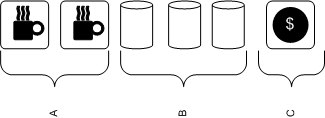
Your typical Starbucks counter layout looks something like this in Canada (simplified):

starbucks_queue

Section A: 2 Espresso machines, steam wands for frothing milk, grinders.
Section B: 3 Thermos canisters of brewed drip coffee: light, medium, dark roast.
Section C: Cash registers, in front of which customers line up.
Job Queue: {DripDarkRoast, DripDarkRoast, Cappuccino, Latte, Cappuccino}

There is no need to view the job queue as FIFO, in fact, it's intuitively obvious that reordering jobs depending on what's available at any moment (out of steamed milk - need to make more, out of ground coffee - need to grind more, etc) should improve the throughput somewhat. Now, assuming you have enough baristas, you can make 2 espresso-based drinks and 1 brewed coffee simultaneously. Maximum throughput will be achieved when all 3 execution units are kept fully busy, which means your drink pipeline should have at least two espresso drinks and one brewed coffee in it to guarantee full utilization after popping the next job off the queue, AND your staff must be allowed to reorder as they see fit. Practically speaking, since pouring a cup of drip coffee takes less time than paying for it, you should have much more than a single drip coffee job in the queue.

So the expediter can indeed cause the throughput to rise - It's clear to me that the job of the expediter is to increase the pipeline length to maximize the chance that all execution units are kept busy. One might argue that this can be done without an expediter, by having the cashiers simply take more orders and queueing them up, but that seems like it would be too much of a cognitive load: in addition to payment processing, they'd be forced to be perfectly aware of what's in the queue, who's busy, which machines are free, etc. The constant context-switching between smiling to customers, counting change, and checking the state of the queue would slow them down, which is why I think it makes sense to offload all of this decision-making to the expediter, who's then free to apply whatever algorithm she chooses in deciding whether to take more orders or pause.

The Smugness Corner

I frequently buy my morning coffee from Bridgehead Coffee in Ottawa, where the barista often sees me standing in line and starts making my usual drink before I get to the cashier to place my order, which results in incredibly low perceived latency. Go Bridgehead.

2008-07-25

Performance investigation of Java's select() in Windows

Java has had select()-based I/O since (I believe) 1.4, through java.nio.channels.Selector and the supporting API. While network I/O over non-blocking SocketChannels has been working fine in one of our [Solace Systems'] messaging software platforms for a long time, and at a more than acceptable throughput, I had never really attempted to precisely measure typical timings of Selector.select() and SocketChannel.write(). That is, until this week, when a coworker coding against Winsock2 wanted to compare his timings against what we got doing similar work in Java. What I found was quite surprising...

Test Design

To get an idea of timings, I quickly bashed out your basic "Hello World" of non-blocking-SocketChannel-using applications (which we'll call the client side), that simply streams data as fast as possible to a netcat (nc) instance in listen mode (the server side). In a Java program, we connect to a remote listening port that was created like so:

nc -kl $PORT > /dev/null

Then we register an interest set of OP_WRITE on that channel, log the time offset (System.nanoTime), and select(). Whenever this returns, we log the time and attempt to write an X kilobyte buffer to the socket, then select again, etc. We also log timings for time spent in write() and the number of bytes written in each call to write(). We'll retry this test for several values of X, getting a sense of how much data is copied from our input buffer to the socket's output buffer on each call to write(), and how long it takes select() to return, indicating space in the socket's send buffer.

Results

First, here's the average time (over ~200 or so writes) spent in select():


WRITE SZ AVG_TIME (us)
1K 396011
2K 654
5K 846
10K 1271
100K 9332


First surprising result: The distribution is pretty much what you'd expect for a 100 mbit network, except for the 1K datapoint, which should just have made you spray coffee on your monitor. The 1K writes start off very fast for the first few samples (~500us), then hit a wall and only get woken up every 500000us, yielding a very, very slow transfer rate (2 KB/s). I initially thought this was due to Nagle preventing a small buffer to be sent before a timeout expired, but setting TCP_NODELAY on the socket had no effect on this behaviour. I can confirm using a packet dump that the server end immediately acks every packet we send to it, so it's not a question of the local TCP send window getting full.

The second weird result is that on Windows, whenever you call SocketChannel.write(ByteBuffer), THE ENTIRE BUFFER GETS COPIED OFF AND REPORTED AS WRITTEN. You'd expect it to write only as many bytes as it can until filling up the local TCP send buffer (sized at SO_SNDBUF, which defaults at 8 KB, as we all know), then return that number, leaving the rest of your input buffer to be copied out on the next call to write(). In fact, that's my understanding of the Sun documentation (emphasis mine):

Writes a sequence of bytes to this channel from the given buffer.

An attempt is made to write up to r bytes to the channel, where r is the number of bytes remaining in the buffer, that is, dst.remaining(), at the moment this method is invoked.

Suppose that a byte sequence of length n is written, where 0 <= n <= r. This byte sequence will be transferred from the buffer starting at index p, where p is the buffer's position at the moment this method is invoked; the index of the last byte written will be p + n - 1. Upon return the buffer's position will be equal to p + n; its limit will not have changed.

Unless otherwise specified, a write operation will return only after writing all of the r requested bytes. Some types of channels, depending upon their state, may write only some of the bytes or possibly none at all. A socket channel in non-blocking mode, for example, cannot write any more bytes than are free in the socket's output buffer.


Open Questions (Mystery!)

So, I'm left with two big questions:

1. What's going on with the 1K writes? I tried TCP_NODELAY on that socket (Nagle's algorithm being the obvious culprit when small writes have huge latency), with no change: select() only wakes up once per 500ms. Also, it happens consistently on every single select. Since the local SO_SNDBUF is 8K, even if there was something fishy going on around that 500ms pause in select(), shouldn't you only get blocked for the full 500ms once per 8 writes? I've never seen this happen in a real-world production app though, so I'm willing to chalk it up to a quirk in my simplistic test code.

2. Isn't it a bit strange that write() returns immediately and always reports writing the full buffer under Windows, even if you pass in a 100MB ByteBuffer to be output with an SO_SNDBUF of only 8K? On 2 UNIX systems I tried it on, it still wrote much, much more than the value of SO_SNDBUF, but the results were all over the place, they didn't always match the size of the input array (as I'd expect).

2008-07-10

Pimpin' thread dump utility class

When you're looking at your source and wondering "how the hell did I get here? Am I on the Swing worker thread, or...", there's a few things you can do to make finding the answer easier.

You've already looked at the call hierarchy with Ctrl+Alt+H, and you can't figure it out. One approach is to just slap down a breakpoint and restart under the Eclipse debugger, but if you put the breakpoint in a method that's called commonly, and you're instead looking for the uncommon hit, it's going to be really annoying to have the debugger jump up every three seconds and click "nope, nope, next, etc" while looking at the call stack.


AAAAUUUUUGH!!

So here's the second option: good old printf debugging. Now there's no one-liner (that I know of) in Java to just dump the current stack (You could instantiate a Throwable and tell it to print its stack in like 2 lines, but how ugly is that?), so here's a little utility class (ThreadUtil.java) you can grab:


import java.io.PrintStream;

/**
* Debugging utility class for printing current thread's stack trace.
*
* To print to STDOUT, just call {@link #printMyStackTrace()}. If using a
* logging framework, instead call {@link #getMyStackTrace()} and log the
* result.
*
* @author Jean-Philippe Daigle
*
*/
public class ThreadUtil {

private ThreadUtil() {
}

/**
* Prints current stack to System.out.
*/
public static void printMyStackTrace() {
printMyStackTrace(System.out);
}

/**
* Prints current stack to the specified PrintStream.
*/
public static void printMyStackTrace(final PrintStream out) {
out.print(getMyStackTrace());
}

/**
* Gets current stack trace as a String.
*/
public static String getMyStackTrace() {
StackTraceElement[] ste_arr = dumpFilteredStack();
StringBuilder sb = new StringBuilder();
sb.append(getHeader()).append("\n");
for (StackTraceElement stackTraceElement : ste_arr) {
sb.append("\t" + stackTraceElement + "\n");
}
return sb.toString();
}

private static StackTraceElement[] dumpFilteredStack() {
StackTraceElement[] ste = Thread.currentThread().getStackTrace();

/*
* The first few elements in the stack will be in Thread.dumpThreads,
* and in the current class, so we need to skip that noise.
*/
int i = 0;
for (i = 0; i < ste.length; i++) {
String cc = ste[i].getClassName();
if (!(cc.equals("java.lang.Thread")
|| cc.equals(ThreadUtil.class.getCanonicalName())))
break;
}

StackTraceElement[] ste2 = new StackTraceElement[ste.length - i];
System.arraycopy(ste, i, ste2, 0, ste2.length);
return ste2;
}

private static String getHeader() {
final Thread ct = Thread.currentThread();
return String.format("Thread: \"%s\" %s id=%s, prio=%s:",
ct.getName(),
ct.isDaemon() ? "daemon " : "",
ct.getId(),
ct.getPriority());
}
}

2008-06-20

Java Devs: Gear Up! (a Shout Out to adaptj and tda)

Found an awesome tool today that I never knew existed, and it blew my mind. It's called StackTrace, from adaptj. There's a free version you can launch using Java Webstart (JNLP). This thing is awesome at solving one small, but all too common problem: being unable to get a thread dump in a running JVM because you don't have the console that launched the java process. (Imagine someone on your QA team calls you up, and says that his nightly build of your app locked up - you ask him three questions: Did you start it with remote debugging enabled? no? Then did you enable log4j logging? no? Did you keep around the console that launched it? Ah, no again, of course. At this point you're usually screwed. But not anymore!)

It looks like this:

CropperCapture[240]

When you start up StackTrace, click the little gear icon or go to Process > Select... and you get a list of all the java processes on your system. Select the desired one, click OK, then back on the main screen hit the "Thread dump" button.

Boom. Instant thread dump of everything in that JVM instance. THIS. IS. HUGE.

Second little discovery of the day is called tda. It's a thread dump analyzer that will open up a saved stack trace and show you exactly which threads own which monitors, and speed up a bit your task of slogging through pages and pages of stack traces. Give it a try:

CropperCapture[241]

2008-06-09

Is Bell's Torrent Throttling Sucking Less?

n.d.a.: My ISP is 295.ca, which is a DSL reseller affected by Bell's torrent throttling.

Screenshot taken at 16:30 today from a terminal window, late afternoon being in the time period where torrents are normally getting throttled down to around 25 k/s:

CropperCapture[238]

185.9 kB/s! (Sure, not great, but for a throttled connection during peak hours this is acceptable.)

2008-06-06

A Lifesaver for Multi-Monitor Users

If, like me, you're used to spending a lot of time in KDE on Linux, trying to move windows around on a large desktop (such as in a multi-monitor setup) on WinXP can be pretty frustrating because there's no native support for KDE's ALT+DRAG method of moving windows.

KDE supporting this is a very Good Thing. Fitts' Law predicts the time required to move a cursor to a target area as a function of the target's size and distance from the current cursor position. It implies that a very large target, close to the mouse pointer, will be much faster to access than a small one, especially if it's further away.

Clipboard02

This explains why it's comparatively hard to move a window under Windows: the cursor has to move from its current position all the way to the top of the window to be moved, which is a wide but not very tall target. KDE's usability improvement is to allow the user to hold the ALT key, and click anywhere within the window, then drag it to a new location. [Which can even be to another virtual desktop, but lack of support for that in WinXP is another stupid annoyance that we'll complain about another time.] This makes the target area as large as the window, so you don't really need any fine motor skills, and the distance to target is often zero, because your pointer is already there.

So here's what I came online to post about: howtogeek.com posted an AutoHotKey script to enable this functionality in Windows. I've been running it for 3 days now without issues, so I'm giving it the thumbs up. Get it now.

2008-05-27

Random Notes from DemoCampOttawa9

All right, I want to jot down a few comments about DemoCampOttawa9 before I go off to bed. Now, I'm a software developer. I'm not a startup entrepreneur, nor an investor, nor someone in any way qualified to comment about how insanely great or ridiculously and laughably stupid a business idea is, so I'll just stick to talking a tiny bit about what I saw tonight. Oh yeah, the pics are up on flickr right here if you're interested, the license is Creative-Commons, and sorry about the wacky colours, it was your typical low-light restaurant / bar room.

DemoCampOttawa is a semi-regular series of meetings where members of the Ottawa high-tech community can go up on stage and show off hardware, software, services they're working on.

First, a big congrats to Alec Saunders for being a smooth and lively host. A nice thing about this evening is that no one that presented was a slick, practiced, PR person - every single presenter was a techy, and that made for an accessible, informal feel.

First up was a presenter from SIMtone. From the demo, they basically seem to rent you a WinXP virtual machine running in a datacenter. You don't just connect over RDP however, they provide a light Java client that runs on very modest hardware that can give you access to your VM instance. The presenter didn't have time to explain how they balanced the hosted VMs across physical boxes, or how much CPU and bandwidth you're allowed to use, etc, but he was accessing it over WiMax and it seemed to work OK. [note: we have WiMax service in Ottawa???]


We got an engineer who implemented a GPU on a Xilinx FPGA. He had it running live on a demo board, but didn't go into much detail about whether he was generating the video signal himself too or if he had much extra hardware on there to do that, etc.

This is Richard Mayer from Protecode. He demo'ed an interesting Eclipse plugin and associated web service that fingerprints external code added to your development projects and tracks the licenses under which it's distributed. It seems the big value here is in the massive database of publicly-distributed code they've built up. Their software can identify not only third-party libraries and source files added to a project, but small chunks of code pasted in as well.


Martin demoing Stockify, a web app for evaluating value stocks. The app looks at historical P/E ratios and earnings growth of public companies.

And finally, Joel and Pascal from picsphere, which makes workflow-management software for event photographers. We've seen plenty of photo-workflow management apps before, but this one seemed to have novel ways of importing the pictures, keeping them tagged by subject, and allowing instant sales at the point of capture (from what I could see in the demo). They were pretty cool because they really didn't project the condescending elitism you usually get from everyone in the photography industry, they felt more like purveyors of software for a more regular-guy, amateurish market (and probably a much larger one, IMHO).

Phew, that's it. I'll surely attend the next meetup, this was overall an interesting night.

2008-04-13

Is Deploying a Wireless Network More Secure Than Not Deploying One?

Yes, I think it is. Long-winded explanation follows.

Me: I'm a guy who loves to work on a laptop. I've owned my little Thinkpad since 2004. I have dragged it between Ottawa and Montreal dozens of times, hauled it through Spain and the United States while vacationing, it's been through several coffee shops in Ottawa, and even tonight, with three other computers in my apartment much faster than this one, I'm in the living room, writing this post on the faithful machine. If you call me up and need help with a build script or a complicated subversion operation, I'll run over to your cube with it and we can hack on the problem together, each on our own screen. Or anyway, I would if there were wireless network access points at the office.

Which there aren't.

(Yes, I'm well aware of the irony of working for a company that makes network equipment. No need to point it out.)

The subject came up on Friday evening, as a bunch of us engineers were sitting around having a beer before leaving for the weekend. Someone (I swear it wasn't me this time) wondered out loud why in this day and age, we didn't have wireless APs at the office. Asked our CTO: "Why don't we just drive to Futureshop and spend the fifty bucks?"

I suppose it's always been a "nice to have" feature of the office, never a true requirement, and commercial-grade WAPs are more expensive than the consumer versions from Linksys. I've also heard mentions that there might be concerns about the security of the setup, given that we lease a floor on a building housing a bunch of other companies. I realized after the discussion, however, that the security argument was bunk, and having no WLAN could actually put us at much greater risk than having one.

It is an oft-repeated saying in security discussions that humans are often the weakest part of a security system. In his book Secrets and Lies, security guru Bruce Schneier again reminds us, as he has before, that an inconvenient security system is self-defeating because humans will simply end up not using it. In Chapter 17, he relates this story:

It has been said that the most insecure system is the one that isn't used. And more often than not, a security system isn't used because it's just too irritating.

Recently I did some work for the security group in a major multinational corporation. They were concerned that their senior management was doing business on insecure phones - land lines and cellular - sometimes in a foreign country. Could I help? There were several secure-voice products, and we talked about them and how they worked. The voice quality was not as good as normal phones. There was a several-second delay at the start of the call while the encryption algorithm was initialized. The phones were a little larger than the smallest and sexiest cellular phones. But their conversations would be encrypted.

Not good enough, said the senior executives. They wanted a secure phone, but they were unwilling to live with inferior voice quality, or longer call setup time. And in the end, they continued talking over insecure phones.

This is exactly the risk that an office takes by not deploying secure, properly configured WAPs managed by the IT team. Wireless networks are a convenience for many. There are some (albeit still rare) laptops appearing that don't even have a network jack anymore; and this is just the beginning of that design trend. Sooner or later, someone will get fed up and install a rogue access point, connected to the corporate LAN, and quite possibly insecurely configured and allowing routing to every resource on the network. It may already have happened. Wishfully thinking otherwise is simply ignoring the human part of the equation, hardly good practice of security.

2008-03-31

Read Jason's post about Stat(CVS|SVN) if you care about repository analysis

My good friend Jason, one of the two talented developers that form micro-ISV LavaBlast Software, just put up a post about exciting happenings in the StatCVS and StatSVN world. Although I'm no longer really involved with those projects, I'm happy to see these developments, and want to give a kudos to guys like Jason Kealey and Benoit Xhenseval and all their collaborators for all the great effort they've put in.

As for myself, I'll be involved in more SVN-related tooling projects in the coming months, but I can't talk about that just now... :)

I need to reply to Jason's conclusion about coming back to Java development, though, especially the note about explicitly creating Integer objects:

"Personally, I enjoy loading up a recent version of Eclipse and working in Java once in a while because it helps me observe the best in both worlds. I much prefer coding in C# because of the easier string manipulation and the fact that everything is an object so you don't have to explicitly create an Integer object from your int to insert it into a collection. However, when working in VS.NET, I dearly miss the automatic incremental compilation feature that Eclipse runs when you save a file."

If it's been a little while since you've looked at Java, know that J2SE 1.5 brought a lot of great improvements especially in the Concurrent and Collections namespaces, as well as new language features. One such usability improvement is known as autoboxing, which means basic numeric types like int or float are automatically "boxed" into their object containers (Integer, Float, etc.) when required, like when adding an element to a collection, and "unboxed" when the native type is required. Just thought you'd like to know, Jason ;)

[It goes without saying that you should always be mindful of the performance impact of creating a bunch of temporary objects like this! Operations on Integers are always going to be slow-ish because they're immutable, and new objects are created for every value you use.]

2008-02-23

Performance Overhead of Non-Final Method Calls in Java

Working with developers who care deeply about application performance, you get around to having frequent interesting discussions about the subject. We end up reviewing every frequent temporary object allocation, scrutinizing every usage of a mutex in the fast-path for possible elimination, etc. Recently the topic was something really simple on the surface: people are afraid to call non-final instance methods, especially in situations where the method being called needs to be resolved to a particular superclass. Is this fear justified?

There is evidence and wisdom out there pointing to a non-trivial performance penalty of non-final method calls: articles like this one (PDF), my boss' repeated assertions, and the Java Platform Performance book, if I recall correctly.

Unfortunately (or fortunately?) I couldn't find, in a simple test, evidence to support these fears. I designed a test that performed a warm-up (to allow HotSpot to compile what it could after seeing how often I was calling specific methods), then used a System.nanoTime() call right before and after a ten-million iteration loop that just calls an "increment a counter" instance method on an object.

Test Cases

java_perf 

  • There is a warmup period before any timing loop (it's also 10,000,000 calls).
  • I'm not doing any object allocation in the timing loop, so the GC won't run and screw up our results.
  • I ran the whole test suite 25 times and averaged the results.
  • Just to be extra safe, I'm getting the counter value at the end of the 10,000,000-call loop to prevent any 'cleverness' from the compiler determining the end result is useless and not doing the call at all.
  • The first two tests deal with trying a final counter incrementing method in SingleClass, as well as a non-final counter incrementing method. SingleClass is declared as final and cannot be subclassed.
  • The second two test cases do the same as the first two, but calling all methods on SubClass.

The Results

CropperCapture[213]

The conclusion seems to be: it doesn't matter at all what you do. I see a few explanations:

  • The common wisdom of there being a significant overhead to non-final method invocations may have been true in previous versions of the JVM, and modern JVMs may have levelled the playing field.
  • My test was flawed in some way. (Doing a counter++ was so simple it got inlined?)

2008-02-05

Ant Tricks: how to find the SVN revision of a directory with Ant

Here's a neat little recipe I wrote when trying to get the current SVN revision of a checked-out project into an Ant property.

Why would you need to do this?

Well, for example, you might want Ant to get the revision number of the source going into the build it's making and use it to name the output directory it creates when deploying your load. (ie: deploy the built library to /projects/myproject/build_svnXXXX/) You might also want to echo that revision number into some resource file to implement a "--version" type of command line option in your application, etc.

Sample Ant Target

<target name="load-svn-revinfo" depends="init-stage1">
    <property name="tmpfilename" value="tmpout.txt" />
    <delete file="${tmpfilename}" failonerror="false" />
    <exec executable="svn" dir="${basedir}/../" output="${tmpfilename}">
    <arg line="info --xml --username ${svn.username} --password ${svn.password} ." />
    </exec>
    <xmlproperty file="${tmpfilename}" prefix="svnprops"/>
    <delete file="${tmpfilename}" failonerror="false" />
    <echo>REV IS: ${svnprops.info.entry(revision)}</echo>
</target>

How it Works

There are basically three steps:

  1. Run an "svn info --xml" on your project sandbox and store the result to a temp file.
  2. Load the temp file into an Ant <xmlproperty/>, with the prefix "svnprops", so we can refer to the revision later in our build script.
  3. Clean up the temp file.

Note that running "svn info --xml ." on your checkout directory will give you output like this:


C:\dev\eclipse_workspace\HEAD_solsuite>svn info --xml .
<?xml version="1.0"?>
<info>
<entry
kind="dir"
path="."
revision="8617">
<url>svn://server/svn/repo/trunk</url>
<repository>
<root>svn://server/svn/repo</root>
<uuid>6e0d6cc3-672d-0410-8be7-bcd0fe73158e</uuid>
</repository>
<wc-info>
<schedule>normal</schedule>
</wc-info>
<commit
revision="8617">
<author>jpdaigle</author>
<date>2008-02-05T21:08:30.585592Z</date>
</commit>
</entry>
</info>


Meaning that once that's loaded with <xmlproperty/>, we can refer to the SVN revision as ${svnprops.info.entry(revision)}. Pretty cool, huh?