2008-10-08

A bit of free money from ING Direct

ING Direct is trying to beat the fray of banks that will be offering TFSAs in January 2009. Even though, to the best of my knowledge, the federal government hasn't yet published the full TFSA rules and details, based on the details available now, banks are starting to jump in.

Here's the announcement they made on October 7th:

Earn special Bonus Interest between October 4th, 2008 and December 31st, 2008 and get saving tax-free earlier!

Because we just couldn’t wait until January 1, 2009 – we’ll cover your taxes!

Bonus Interest!

While we can’t help you avoid taxes in 2008, we can pay you more than enough bonus interest to cover those taxes! Effective January 1, 2009, funds deposited in the promotional Tax-Free Investment Savings Account opened between October 4 and December 31 will be transferred to a new Tax-Free Savings Account so you won’t miss a minute of Tax-Free interest.

Open an ING DIRECT promotional tax-free Investment Savings Account today and on December 31st we will double your interest payment. This should be enough to cover any tax you’ll need to pay on interest earned and will help you get a head start for tax-free saving in January.

Tax-Free

With the new Tax-Free Savings Account, any interest earned in an ING DIRECT Tax-Free Savings Account will not be taxed.


It seems this account is identical to their regular savings account, except it automatically gets registered as a TFSA on 1 January 2009, and on 31 December 2008, it gets a bonus interest payment equal to all the interest paid in the last 11 weeks of the year (from now until 31 December). They're marketing the bonus payment as a way to offset taxes paid on the regular portion of the interest in 2008, since TFSAs don't yet exist.

I'm not normally a fan of trivial quarter-point rate chasing between banks, but assuming you've got a savings account at ING Direct already (I keep my emergency cash at ING), I see absolutely no downside to getting in on this.

It took me about 2 minutes to login, create an anticipated TFSA, and transfer 5000$ from regular savings to the new account. At the current 3% rate, with monthly compounding, the expected interest on 5000$ between now and December 31st is around 35$, so they're giving away 35$ for two minutes of work.

2008-09-26

Dealing With a Cold

Holy crap, what a crummy week. Caught a cold, saw productivity go down a bit, but was able to pull through without missing any work thanks in part to reading Eric Rescorla's blog post about "Managing the Common Cold". The guy is an engineer / security guru but he happens to post frequently about statistics and health, and in this case he's really on to something as he goes much further than the classic advice: "Oh just take a Tylenol Cold and stop whining":

  • Nasal sprays and pseudoephedrine for congestion: He recommends Flonase, which requires a prescription, but I've had luck this week with an OTC decongestant spray once a day (mindful of widely-reported acclimatation effects) and Advil Cold & Sinus. I feel kind of stupid for buying Advil, as it's just ibuprofen and pseudoephedrine, but it was recommended by a colleague; next time I'll go generic.

  • diphenhydramine hydrochloride, an antihistamine with sedative effects to help fall asleep: costs practically nothing in generic form. Quite effective.

2008-09-24

The Absolutely Essential Software List for Mac Newbies

This is for my friend Jason Kealey, who finally got a MacBook Pro today. Welcome to the awesomeness of OSX :)

Newbies, here's the absolutely essential, grab-this-software-today stuff you want to go install:
I still haven't found a perfect image editor. I'm thinking of dropping the cash for Pixelmator, but even on a new MBP it feels a bit sluggish... I'm still wrestling with the decision while my trial period ticks down.

The fact that this list is actually pretty small for me means OSX is, really, quite a bit more functional out of the box than Windows. Bundling of software with an operating system can be a bit contentious, but I think OSX generally gets at least this correct.

2008-09-05

Ask TUAW - Finding which processes own which network connections - Here, I'll Save You 30 Bucks

A good question popped up on Ask TUAW today:

Richard asks
I have recently noticed that I have a fairly constant upload of 14-16 KB/s going on in the background (I'm using iSlayer's iStat menus), even though I haven't initiated any upload. I'm not now running any online backup apps. I've checked in Activity Monitor, and can't see anything very out of the ordinary there, although evidently I've missed something. Is there an easy way to see which applications/processes are using the network connection? Or should I get Little Snitch? It's quite annoying to see that the network connection is being used, and being unsure about what is using it. It's potentially disastrous when I'm using metered connections!

Here's the answer TUAW gave:

Little Snitch ($29.95) is probably the easiest way to go. There's also another recently released net monitoring application called ProteMac Meter ($29.95) which might be worth checking out. I don't recommend Glowworm FW as I've had serious problems with it under Leopard and have found others reporting similar difficulties. It may be that the demos of one of these application will be enough to find the source of your unknown network traffic.

Ummm, let me save you 30 bucks and a download, dude, OS X has everything you need built in:

lsof -i

Lists open sockets. Output looks like this, presto!

COMMAND     PID     USER   FD   TYPE    DEVICE SIZE/OFF NODE NAME
Quicksilv 784 jpdaigle 253u IPv4 0x4baba68 0t0 TCP 192.168.1.121:64139->host44.hrwebservices.net:http (CLOSE_WAIT)
SystemUIS 13716 jpdaigle 10u IPv4 0x431a880 0t0 UDP *:*
Mail 23859 jpdaigle 17u IPv4 0x51cb270 0t0 TCP 192.168.1.31:55041->webaccess.hostedmail.net:imaps (ESTABLISHED)
Mail 23859 jpdaigle 18u IPv4 0x6d7d270 0t0 TCP 192.168.1.31:55043->webaccess.hostedmail.net:imaps (ESTABLISHED)
Mail 23859 jpdaigle 23u IPv4 0x8587e64 0t0 TCP 192.168.1.31:55049->webaccess.hostedmail.net:imaps (ESTABLISHED)
Mail 23859 jpdaigle 26u IPv4 0x58f8e64 0t0 TCP 192.168.1.31:55044->webaccess.hostedmail.net:imaps (ESTABLISHED)
firefox-b 25763 jpdaigle 31u IPv4 0x703266c 0t0 TCP 192.168.1.31:55088->64.26.141.78:http (ESTABLISHED)
firefox-b 25763 jpdaigle 36u IPv4 0x9779270 0t0 TCP 192.168.1.31:55089->64.26.141.71:http (ESTABLISHED)

2008-08-30

Upgrading a Pay-as-You-Go Fido Account to an iPhone 3-Year Contract: Nontrivial

There's probably nothing too original at this point about someone blogging about problems buying a new phone from Fido, but, well, this particular problem, I haven't seen mentioned yet.

Walked up to a Fido booth tonight thinking I'd buy a new phone (not important which one for this story, but gee, I think you can take a guess). "In and out in 15 minutes", thought I. Ha. I've got to say though, the employees there, for all their trouble in getting things done, tried really hard and were so patient on the phone with the mothership (yes, the employees get put on hold for an hour too) that I really can't blame them at all.

I'm with Fido on a Pay-as-You-Go plan (prepaid airtime), and since I've been a customer for a while I have a bunch of rebate dollars (called FidoDollars) usable as credit towards new phones. Problem is, you can't walk into a Fido store and get your prepaid account converted to a 3-year contract while keeping the same phone number and already accumulated airtime credit. Can't be done, no matter how long the poor salespeople stay on hold with the customer service center trying to make it happen.

There are two main options available if you're already a Fido customer on Pay-as-You-Go, neither of them particularly appealing:

  • Buy the JesusPhone(TM) from the Fido store, have them activate it on a new phone number with a new account on a 3-year contract. You lose your existing phone number (well, it actually stays active on your old phone, but what use is that?) and get a new one. You can't use FidoDollars credit to help pay for the new phone, and you'll lose all your prepaid airtime when it expires. They have absolutely no way to use your FidoDollars or transfer your prepaid airtime credit.

  • Have the Fido store order a JesusPhone(TM) (by phone, which takes over 30 minutes for some reason) for you from the customer service center. You can keep your phone number and use your FidoDollars to help pay for the new phone, and also any unused prepaid airtime will be credited to your monthly bill. Perfect, except they'll start billing you your monthly contract BEFORE you receive the new phone, and as the sales girl explained, you'll then have to call customer service when you do get the new phone up and running and get them to credit a pro-rated portion of the month. Also, it takes ~10-12 days and you have to pay the 250$ charge cash on delivery when you receive the new phone. Finally, to pour MORE salt on that wound, it won't even work out of the box because you must then drive back to the Fido store and have them transfer the phone number from your old SIM to your new SIM. But the cherry on the sundae is reserved for the Fido employees: as I learned, they don't make any commission on this sale even after working for an hour and a half trying to sort it out and spending an hour on the phone, because it's ultimately completed as a phone order.

How nice. I went with the second option. I'm expecting a package, for which I have no tracking number, to show up in around 10 days, with cash-on-delivery. Sweet.

For the record, the Fido employees agreed this was completely ridiculous, they're just powerless to do anything about it.

I leave you with this piece of news, however: the voice plan I signed up for is a new plan just introduced this week (not yet advertised on their site), and it's fantastic: 17.50$ a month for 200 daytime minutes + unlimited evenings and weekends. I think this is the cheapest voice plan I've ever seen - add 30$ for 6GB of data and you're paying only 47.50$ + fees per month, which is actually really decent. Looking on their website, there's no plan anywhere even close to that cheap that offers unlimited evenings and weekends, so this is a really great deal, I suppose it's a time-limited promotional offer, but I've got it locked in for 3 years now.

2008-08-24

Wake-up Call for the Foodie

Or: I fail at omnivorism, apparently.

I know how much everyone hates blog memes that rely on propagating lists, but this one has merit as a device to instill humility in this foodie's psyche and renew my drive for exploration and experimentation. I'm talking, of course, about the Very Good Taste Omnivore's Hundred, a list of 100 foods that's making the rounds right now, billed as a collection of meals any self-respecting omnivore must have tried at least once.

Why am I calling this a wake-up call? Because I just went through the exercise and scored a rather pathetic 56%, forcing me to realize just how little I've really experienced. Try it yourself.

Here are the instructions from the original post:
* Copy this list into your blog or journal, including these instructions.
* Bold all the items you've eaten.
* Cross out any items that you would never consider eating.
* Optional extra: Post a comment here at www.verygoodtaste.co.uk linking to your results.

I'm crossing out Whole insects, Fugu, and Roadkill, so I'm really aiming for a score out of 97. Oh, and the insects thing is probably negotiable after a couple of drinks. I did my counting on Google Spreadsheets, so the following should get automatically updated whenever I check off something new.


Update: ah of course, the iframe won't show up in RSS readers. You have to click to go to the real page.

Kimchi

I just want to post a pointer to Ron Eade's recent blog entry about making kimchi at home. A quick perusal of the instructions reveal it's a fairly involved multi-step process, but overall it still seems simpler than I'd ever imagined.


I buy my kimchi at 168 Market on Somerset, but they seem to only have a single variety and it's not quite as good as what they serve at, say, Seoul House. I've asked around and people seem to only be aware of 168 Market as a source, so perhaps I should try making my own someday - I'd just have to massively scale down the quantities from Mr Eade's typical batch size!

2008-08-13

What exactly are Dell and Costco selling here?


Just got a weird little something in the mailbox: a Costco marketing email drew my attention with a rather unusual-looking picture of some Dell machines. I clicked on to the website:

What's Costco Selling?

Hmm, that desktop image sure seems familiar, doesn't it?

dell2

Perfect match! Who wants a Dell XPS with OSX? Maybe this is the Creative-Commons-licensed version of Apple's famous desktop image? ;-)

2008-08-07

Age is strictly a case of mind over matter. If you don't mind, it doesn't matter. --Jack Benny

I got ID'd at the LCBO this week. Youth is still mine. Made me happy :)

2008-08-03

Visa Desjardins' fraud detection

Visa Desjardins has, for the second time in as many months, deemed some of my account activity suspicious. Since they're on the hook, financially, for unauthorized transactions I can understand them having a certain bias towards prudence, but in both cases when I spoke to a CSR, the reason stated was quite vague ("this activity doesn't fit your account's pattern").

I would love to learn (out of personal interest, really, I'm not complaining!) about the decision rules or heuristics that apply here considering the two suspicious charges that were delayed this weekend.

The first is a 25$ renewal of my Flickr Pro account, charged by Yahoo. The CSR said that getting a charge from an online service provider was flagged. Never mind that I've got monthly credit-card charges from my ISP for Internet access, and from rsync.net for storage space, and that my account has, in the past, seen charges from a large gaggle of other online sellers.

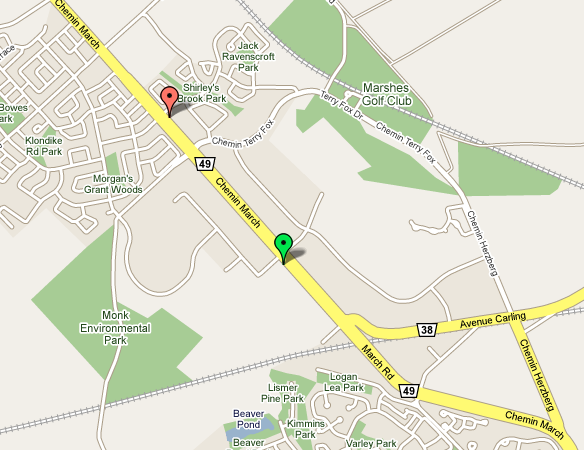
The second is even more comical: it's a charge from a gas station in Kanata.


The green placemark is the Esso station where I always fill up, it's at the corner of Solandt and March in Kanata, right next to the office. It was closed this week, so I went to the Shell station instead (the red placemark) 1200 meters away. That got me flagged. Really.

2008-08-02

Good Sentences

From The Fishbowl:

In the news this morning, US Department of Homeland Security regulations allow them to confiscate laptops at the border, or duplicate any data, without any suspicion of wrongdoing on the part of the laptop’s owner.

It’s a very timely move by the DHS. You never know when someone might invent a global, unregulated data network that could allow evildoers to entirely bypass such checkpoints, making them nothing more than a sham way for border police to rake through people’s private data and copy their mp3 collections.
[...]


The scary thing is I don't really see a way to defend against this. Even if you take the nuclear option and wipe everything, putting it online, and cross the border with a squeaky-clean laptop, there's still a chance your hardware gets confiscated. I wonder if travel insurance would cover seizure of hardware by foreign customs?

2008-07-30

I Think Spolsky Missed a Detail About Starbucks Queueing

This week saw the publication of another Inc.com article by the inimitable Joel Spolsky, and as usual it's a fun, geeky read. His ranting analysis of the queueing and order taking procedures at Starbucks supplement a section about an instance of unfriendliness on the part of the staff, which I'll ignore in favour of concentrating on the (more interesting and less Godin-esque) part of the article on queueing procedures and order taking.

Read the original article [http://www.inc.com/magazine/20080801/how-hard-could-it-be-good-system-bad-system.html]; I'm only reproducing a small, relevant portion here:

"Her main job was to go down the line of people waiting to order and ask them what they wanted in advance of their arriving at the cash register. There, they would be asked to repeat their order before paying and finally joining the line of customers waiting for their drinks to appear.

This premature order taking did not appear to improve the store's productivity. The cashiers still had to take the same number of orders, wait for the customers to fiddle with their purses for the correct change, and so forth. The coffee producers -- known theatrically in the trade as baristas -- still had to make the same number of drinks. The biggest benefit of the procedure, I thought, was that the barista got started on a drink a few seconds earlier, so people got their orders filled a little bit faster, even though the overall rate of output for the store was the same.

A network engineer would say this was a situation of 'same bandwidth, lower latency' [...]"

I disagree!

Armchair Psychology

Firstly, I might have a bit of an issue with the claim of lowering perceived latency by reducing the gap between paying at the register and receiving your drink, because I believe I'd start measuring latency when first giving the order, not when paying. Let's ignore that though; Spolsky correctly assumes the early order-taking is useful in preventing customers from giving up and leaving when faced with a long line. This should be no surprise to anyone who's read Robert Cialdini's Influence: The Psychology of Persuasion [http://www.amazon.com/Influence-Psychology-Persuasion-Robert-Cialdini/dp/0688128165] Once we've expressed a choice, painted a mental picture of ourselves as buying a cup of Starbucks coffee this morning, our internal need for self-consistency will force us to rationalize staying, even in the face of long lines. Seriously, read this book, it's an eye opener.

The Benefit of Longer Queues

Ahem, sorry for the digression - back to queueing. Joel states:

"[...] while not even increasing the total number of Frappuccino Blended Coffees that could be produced per unit of time?"

Aha, that's the thing! What's missing here is that the goal isn't to increase the Frappuccino throughput, it's to increase the total throughput across all drinks, and it's absolutely crucial to realize that the drinks are different, and have different preparation times. I think the point of the pre-order taking is to increase the job queue length, and that increasing total throughput by doing this is actually an achievable goal.

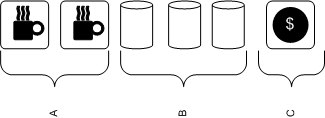
Your typical Starbucks counter layout looks something like this in Canada (simplified):

starbucks_queue

Section A: 2 Espresso machines, steam wands for frothing milk, grinders.
Section B: 3 Thermos canisters of brewed drip coffee: light, medium, dark roast.
Section C: Cash registers, in front of which customers line up.
Job Queue: {DripDarkRoast, DripDarkRoast, Cappuccino, Latte, Cappuccino}

There is no need to view the job queue as FIFO, in fact, it's intuitively obvious that reordering jobs depending on what's available at any moment (out of steamed milk - need to make more, out of ground coffee - need to grind more, etc) should improve the throughput somewhat. Now, assuming you have enough baristas, you can make 2 espresso-based drinks and 1 brewed coffee simultaneously. Maximum throughput will be achieved when all 3 execution units are kept fully busy, which means your drink pipeline should have at least two espresso drinks and one brewed coffee in it to guarantee full utilization after popping the next job off the queue, AND your staff must be allowed to reorder as they see fit. Practically speaking, since pouring a cup of drip coffee takes less time than paying for it, you should have much more than a single drip coffee job in the queue.

So the expediter can indeed cause the throughput to rise - It's clear to me that the job of the expediter is to increase the pipeline length to maximize the chance that all execution units are kept busy. One might argue that this can be done without an expediter, by having the cashiers simply take more orders and queueing them up, but that seems like it would be too much of a cognitive load: in addition to payment processing, they'd be forced to be perfectly aware of what's in the queue, who's busy, which machines are free, etc. The constant context-switching between smiling to customers, counting change, and checking the state of the queue would slow them down, which is why I think it makes sense to offload all of this decision-making to the expediter, who's then free to apply whatever algorithm she chooses in deciding whether to take more orders or pause.

The Smugness Corner

I frequently buy my morning coffee from Bridgehead Coffee in Ottawa, where the barista often sees me standing in line and starts making my usual drink before I get to the cashier to place my order, which results in incredibly low perceived latency. Go Bridgehead.

2008-07-25

Performance investigation of Java's select() in Windows

Java has had select()-based I/O since (I believe) 1.4, through java.nio.channels.Selector and the supporting API. While network I/O over non-blocking SocketChannels has been working fine in one of our [Solace Systems'] messaging software platforms for a long time, and at a more than acceptable throughput, I had never really attempted to precisely measure typical timings of Selector.select() and SocketChannel.write(). That is, until this week, when a coworker coding against Winsock2 wanted to compare his timings against what we got doing similar work in Java. What I found was quite surprising...

Test Design

To get an idea of timings, I quickly bashed out your basic "Hello World" of non-blocking-SocketChannel-using applications (which we'll call the client side), that simply streams data as fast as possible to a netcat (nc) instance in listen mode (the server side). In a Java program, we connect to a remote listening port that was created like so:

nc -kl $PORT > /dev/null

Then we register an interest set of OP_WRITE on that channel, log the time offset (System.nanoTime), and select(). Whenever this returns, we log the time and attempt to write an X kilobyte buffer to the socket, then select again, etc. We also log timings for time spent in write() and the number of bytes written in each call to write(). We'll retry this test for several values of X, getting a sense of how much data is copied from our input buffer to the socket's output buffer on each call to write(), and how long it takes select() to return, indicating space in the socket's send buffer.

Results

First, here's the average time (over ~200 or so writes) spent in select():


WRITE SZ AVG_TIME (us)
1K 396011
2K 654
5K 846
10K 1271
100K 9332


First surprising result: The distribution is pretty much what you'd expect for a 100 mbit network, except for the 1K datapoint, which should just have made you spray coffee on your monitor. The 1K writes start off very fast for the first few samples (~500us), then hit a wall and only get woken up every 500000us, yielding a very, very slow transfer rate (2 KB/s). I initially thought this was due to Nagle preventing a small buffer to be sent before a timeout expired, but setting TCP_NODELAY on the socket had no effect on this behaviour. I can confirm using a packet dump that the server end immediately acks every packet we send to it, so it's not a question of the local TCP send window getting full.

The second weird result is that on Windows, whenever you call SocketChannel.write(ByteBuffer), THE ENTIRE BUFFER GETS COPIED OFF AND REPORTED AS WRITTEN. You'd expect it to write only as many bytes as it can until filling up the local TCP send buffer (sized at SO_SNDBUF, which defaults at 8 KB, as we all know), then return that number, leaving the rest of your input buffer to be copied out on the next call to write(). In fact, that's my understanding of the Sun documentation (emphasis mine):

Writes a sequence of bytes to this channel from the given buffer.

An attempt is made to write up to r bytes to the channel, where r is the number of bytes remaining in the buffer, that is, dst.remaining(), at the moment this method is invoked.

Suppose that a byte sequence of length n is written, where 0 <= n <= r. This byte sequence will be transferred from the buffer starting at index p, where p is the buffer's position at the moment this method is invoked; the index of the last byte written will be p + n - 1. Upon return the buffer's position will be equal to p + n; its limit will not have changed.

Unless otherwise specified, a write operation will return only after writing all of the r requested bytes. Some types of channels, depending upon their state, may write only some of the bytes or possibly none at all. A socket channel in non-blocking mode, for example, cannot write any more bytes than are free in the socket's output buffer.


Open Questions (Mystery!)

So, I'm left with two big questions:

1. What's going on with the 1K writes? I tried TCP_NODELAY on that socket (Nagle's algorithm being the obvious culprit when small writes have huge latency), with no change: select() only wakes up once per 500ms. Also, it happens consistently on every single select. Since the local SO_SNDBUF is 8K, even if there was something fishy going on around that 500ms pause in select(), shouldn't you only get blocked for the full 500ms once per 8 writes? I've never seen this happen in a real-world production app though, so I'm willing to chalk it up to a quirk in my simplistic test code.

2. Isn't it a bit strange that write() returns immediately and always reports writing the full buffer under Windows, even if you pass in a 100MB ByteBuffer to be output with an SO_SNDBUF of only 8K? On 2 UNIX systems I tried it on, it still wrote much, much more than the value of SO_SNDBUF, but the results were all over the place, they didn't always match the size of the input array (as I'd expect).

2008-07-10

Pimpin' thread dump utility class

When you're looking at your source and wondering "how the hell did I get here? Am I on the Swing worker thread, or...", there's a few things you can do to make finding the answer easier.

You've already looked at the call hierarchy with Ctrl+Alt+H, and you can't figure it out. One approach is to just slap down a breakpoint and restart under the Eclipse debugger, but if you put the breakpoint in a method that's called commonly, and you're instead looking for the uncommon hit, it's going to be really annoying to have the debugger jump up every three seconds and click "nope, nope, next, etc" while looking at the call stack.


AAAAUUUUUGH!!

So here's the second option: good old printf debugging. Now there's no one-liner (that I know of) in Java to just dump the current stack (You could instantiate a Throwable and tell it to print its stack in like 2 lines, but how ugly is that?), so here's a little utility class (ThreadUtil.java) you can grab:


import java.io.PrintStream;

/**
* Debugging utility class for printing current thread's stack trace.
*
* To print to STDOUT, just call {@link #printMyStackTrace()}. If using a
* logging framework, instead call {@link #getMyStackTrace()} and log the
* result.
*
* @author Jean-Philippe Daigle
*
*/
public class ThreadUtil {

private ThreadUtil() {
}

/**
* Prints current stack to System.out.
*/
public static void printMyStackTrace() {
printMyStackTrace(System.out);
}

/**
* Prints current stack to the specified PrintStream.
*/
public static void printMyStackTrace(final PrintStream out) {
out.print(getMyStackTrace());
}

/**
* Gets current stack trace as a String.
*/
public static String getMyStackTrace() {
StackTraceElement[] ste_arr = dumpFilteredStack();
StringBuilder sb = new StringBuilder();
sb.append(getHeader()).append("\n");
for (StackTraceElement stackTraceElement : ste_arr) {
sb.append("\t" + stackTraceElement + "\n");
}
return sb.toString();
}

private static StackTraceElement[] dumpFilteredStack() {
StackTraceElement[] ste = Thread.currentThread().getStackTrace();

/*
* The first few elements in the stack will be in Thread.dumpThreads,
* and in the current class, so we need to skip that noise.
*/
int i = 0;
for (i = 0; i < ste.length; i++) {
String cc = ste[i].getClassName();
if (!(cc.equals("java.lang.Thread")
|| cc.equals(ThreadUtil.class.getCanonicalName())))
break;
}

StackTraceElement[] ste2 = new StackTraceElement[ste.length - i];
System.arraycopy(ste, i, ste2, 0, ste2.length);
return ste2;
}

private static String getHeader() {
final Thread ct = Thread.currentThread();
return String.format("Thread: \"%s\" %s id=%s, prio=%s:",
ct.getName(),
ct.isDaemon() ? "daemon " : "",
ct.getId(),
ct.getPriority());
}
}

2008-07-08

How to steal a car

I dropped off my car at the Honda dealership this morning to have them investigate the mysterious Check Engine light that came on yesterday. This post was inspired by what happened tonight when I swung by after work to pick up the car - I'm not chastising them for the security flaw, I mostly just find it charming and cute.


I was there about two minutes, and this is the conversation as I remember it, see if you can spot the tiny flaw:


[I enter the service area of the dealership and walk over to the clerk, then sit down in front of him. A car key is lying on the desk, sporting a little tag with my last name scrawled on it in big block letters: DAIGLE.]

- Clerk: Hi!

- JP: Hi, picking up my car...

- Name?

- Daigle

- Oh yeah, just closing that file now, here's your key.

- So what was wrong with it?

- Coolant temperature sensor failed.

- Huh.

- Yeah, it was under warranty, so you're good to go!

- Thanks, good night!

[I exit the dealership, key in hand, and drive off.]


Human beings are usually the weakest link in any security system :)